
iPhone, Android and browser
RossoWin App
RossoWin works in any mobile browser, and iPhone owners can also pin its Official iOS App to the home screen with six taps. Depositors who install it get 10 free spins. This page shows how the install works, what the app looks like, which buttons you will use most and how to get the same shortcut on Android.
- 6install steps
- +10 FSfor depositors
- 5bottom bar buttons
- 0store downloads
Install
Installing the Official iOS App
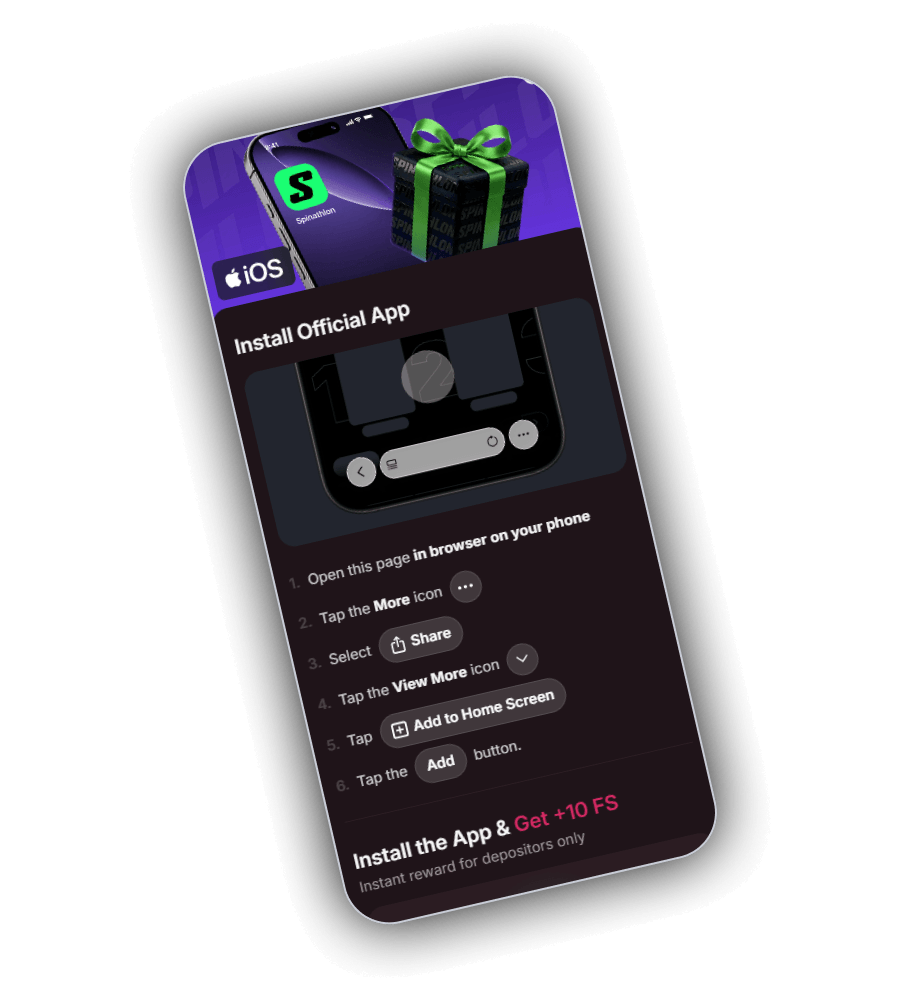
You reach the install guide through the strip promoting the iOS app, either by tapping the strip or its white Get button. It has an iOS badge, a picture of the Safari address bar and six numbered steps.
The app is a web app, so it does not come from the App Store. Safari places the RossoWin icon on your home screen, and tapping it opens the site full screen without the address bar.
The six steps
Open this page in the browser on your phone.
Tap the More icon, the three dots next to the address bar.
Select Share.
Tap the View More icon to see the full list of actions.
Tap Add to Home Screen.
Tap the Add button to finish.
Use Safari for the install on an iPhone. Other browsers on iOS may not show Add to Home Screen in the Share menu.
Reward
10 free spins for app users
At the bottom of the install guide the line Install the App and Get +10 FS is printed in white and crimson, with the note Instant reward for depositors only. The reward has two conditions: the app must be on your home screen, and you must have made a deposit.
Log in through the new icon after the install. When both conditions are met the spins are credited, and they show up in the gift tab, Free Money.
As with other free spins, winnings from the 10 spins usually carry wagering. Open the reward in Free Money to see the slot, the value per spin and the wagering before you play.
| Item | Detail |
|---|---|
| Reward | 10 free spins |
| Who qualifies | players who install the app and deposit |
| Where to find it | Free Money tab |
| Platform in the guide | iOS |
Layout
What the app looks like
The app shows the same dark plum screens as the website. The header has the burger menu, the RossoWin logo, the language flag, Log in and Register. Under it you get the lobby rows: New, TOP Live Casino, Bonus Wager and more.
The bottom bar is the part you will use most. It has five buttons and stays in place while you scroll.
| Button | Icon | Opens |
|---|---|---|
| Casino | clover | the lobby with all game rows |
| Free Money | gift box | promotions, promo codes and the jackpot |
| Join Now or profile | person in a crimson circle | registration, or your account when logged in |
| Shop | crown | the VIP Market |
| Sports | football | the sportsbook |
Just above that bar, on the right, hovers a round magnifier. Type a few letters of a game name there and the title appears, faster than scrolling row after row on a small screen.
Android
Getting the shortcut on Android
The guide on RossoWin is written for the iPhone, but the same kind of shortcut works on Android. In Chrome, load RossoWin, press the three dots in the upper right corner and pick the install option in that menu. Confirm, and the RossoWin icon appears with your other apps.
Samsung Internet keeps the option in its lower menu, under Add page to and then Home screen. The result is the same window without browser bars.
Whether the 10 free spins also apply to an Android install is set by the reward rules in Free Money. Check there, or ask support, before you count on them.
Tips
Getting the most out of the app
- Turn on Face ID or a passcode on your phone, because the app keeps you logged in
- Use Apple Pay or Google Pay in the cashier for deposits without typing card numbers
- Keep the phone software up to date so the web app runs smoothly
- Use the search button instead of scrolling when you know the game name
- Set deposit limits in your profile so they apply on every device
The app does not change the rules of the games, the bonus terms or the payment limits. Everything works exactly as it does on the website, because it is the website with its own icon.
FAQ
RossoWin app questions
Is the RossoWin app in the App Store?
No. It is a web app that Safari pins to the iPhone home screen. It opens RossoWin in its own window with your normal account.
How many free spins do I get for installing it?
10 free spins. The banner calls them an instant reward for depositors only, so they arrive once you have installed the app and made a deposit.
Does the app work on Android?
The install guide on RossoWin is written for iOS. Android users can still make the same shortcut through the Chrome menu, with the Install app option.
Do I need a new account for the app?
No. The app runs the same site, so you log in with the email and password you already use, and your balance, bonuses and bets are all there.
How much storage does it need?
Very little. A web app is a shortcut to the site with its own icon and window, so it does not install a large package on your phone.